In today’s fast-paced digital world, staying organized and productive isn’t just an advantage — it’s a necessity. Whether you’re a student managing assignments, a professional juggling meetings, or a creator planning your next big idea, productivity apps have become essential tools for simplifying life. With smarter technology, AI integration, automation, and improved design, the latest apps can dramatically transform how you work, think, plan, and execute tasks.
This year’s productivity apps are more intuitive, more powerful, and more personalized than ever. They help you reduce clutter, eliminate repetitive tasks, improve focus, and manage time effectively. Here’s a complete guide to the top productivity apps that will transform your daily routine and help you reach your goals faster.
1. ChatGPT – Your Everyday Thinking & Planning Partner
AI has become the backbone of modern productivity, and ChatGPT remains the most versatile AI assistant available today. It helps users:
- Draft emails in seconds
- Summarize long documents
- Break down complex concepts
- Generate ideas
- Create schedules
- Plan projects
- Solve problems
- Improve writing
With voice interaction, image understanding, and personalized workflows, ChatGPT has evolved into a true digital partner. It adapts to your style, learns your preferences, and provides tailored support that boosts productivity across all areas of life.
If you want an assistant that can think with you, not just for you, this app is a must-have.
2. Notion – The Ultimate All-In-One Organization Tool
Notion is one of the most powerful productivity tools because it lets you create a workspace that matches your personal workflow. Whether you want to track goals, manage tasks, plan projects, take notes, or run a business, Notion offers unmatched flexibility.
With features like:
- Databases
- Boards
- Calendars
- Templates
- Checklists
- Collaboration tools
… you can build your own system — from simple to advanced. This year’s update includes AI-powered suggestions, automation, and smart templates that streamline your routine. Notion is perfect for professionals, students, teams, and creators who want deeper control over their daily structure.
3. Google Keep / Apple Notes – Simple, Fast Note-Taking
Sometimes productivity doesn’t require complex systems. A simple note-taking app can transform your daily routine by ensuring ideas are never lost. Google Keep, Apple Notes, and similar apps make it easy to:
- Capture thoughts instantly
- Create checklists
- Save reminders
- Sync across devices
- Organize important info
Their clean, minimal design ensures your focus stays on the task, not on the tool. For people who prefer speed and simplicity, these apps are invaluable.
4. Todoist – Smart Task & Habit Management
Todoist has long been a favorite for task management, and with its newest upgrades, it’s even better. The app helps you structure your day with:
- Daily and weekly goals
- Priority-based task sorting
- Habit tracking
- Recurring reminders
- Project organization
- Integration with calendars and email
Its clean interface, color-coded labeling, and intuitive design make it incredibly easy to stay on track. If you struggle with remembering tasks, organizing your workload, or sticking to habits, Todoist can transform your routine.
5. Microsoft OneNote – The Best Digital Notebook for Organized Minds
OneNote stands out as a digital notebook that mirrors the experience of jotting ideas in a real book. Its biggest strength is organization — you can create notebooks, sections, and pages, all color-coded and searchable.
It’s perfect for:
- Students taking lecture notes
- Professionals documenting meetings
- Creatives brainstorming ideas
- Anyone building long-term knowledge archives
With stylus support, typing tools, and multimedia options, OneNote helps you organize your brain in one place.
6. Trello – Visual Project & Task Management
Trello is one of the simplest yet most powerful visual productivity apps. Its board-and-card system makes it easy to understand and track:
- Work projects
- Content schedules
- Personal goals
- Team tasks
- Event planning
You can drag, drop, label, comment, and collaborate in real time. Trello reduces mental clutter and gives you a full view of your ongoing tasks. If you love visuals, Trello can dramatically improve how you plan your day.
7. Google Calendar – The Essential Time Management Tool
A well-planned schedule can double your productivity. Google Calendar remains one of the most important time-management apps because it keeps your entire day organized with:
- Event scheduling
- Reminders
- Notifications
- Color coding
- Shared calendars
- Sync across devices
Whether you’re planning work meetings, daily habits, personal routines, or long-term goals, Google Calendar ensures nothing slips through the cracks.
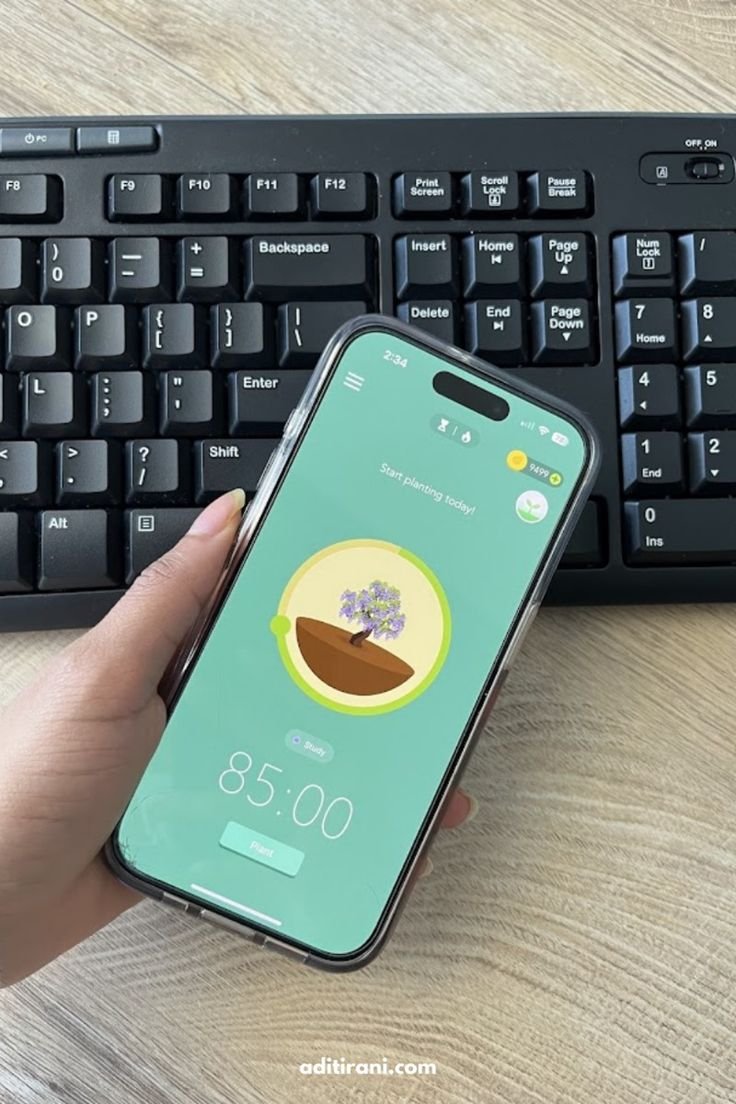
8. Forest – Stay Focused and Beat Digital Distractions
With so many distractions on our phones, staying focused is a challenge. Forest solves this by turning productivity into a game. You plant a virtual tree that grows only if you stay off your phone. If you exit the app, the tree dies.
This simple concept helps users:
- Stay focused during work or study sessions
- Build concentration habits
- Reduce screen addiction
- Develop discipline
Forest is especially helpful for students, remote workers, and anyone who wants to control phone usage.
9. Pomodoro Apps – Work in Efficient Time Cycles
Pomodoro timer apps like Focus To-Do or other similar tools help you break tasks into focused intervals, typically 25 minutes of work followed by a short break.
The Pomodoro method helps:
- Increase concentration
- Reduce burnout
- Improve time awareness
- Boost productivity in short bursts
Using Pomodoro tools daily makes your routine more structured and efficient.
10. Habit Tracking Apps – Build Life-Changing Routines
Apps like Habitify, Loop, or other habit trackers help you build consistency in your daily behaviors. They allow you to:
- Track habits visually
- Set streaks
- Receive reminders
- Analyze progress
- Stay accountable
Whether you’re trying to drink more water, read daily, wake up early, or exercise regularly, a habit tracker can transform your routine by turning small habits into big achievements.
11. Slack / Microsoft Teams – Smooth Communication & Collaboration
For professionals and remote teams, communication apps like Slack and Teams help streamline work by centralizing:
- Team chats
- Project channels
- File sharing
- Integrations
- Task management
- Meetings
They reduce email overload and keep teams connected in real time. These apps are essential for anyone working in a collaborative environment.
12. Cloud Storage Apps – Keep Your Digital Life Organized
Having instant access to your files, notes, photos, and documents is crucial. Apps like Google Drive, Dropbox, and other cloud services help you:
- Store large files
- Sync across devices
- Share work easily
- Keep backups secure
- Organize digital content
These apps remove the stress of losing data and keep your workflow smooth.
Final Thoughts
Productivity isn’t just about working harder — it’s about working smarter. The right apps help you streamline your routine, stay organized, reduce stress, and focus on what truly matters. From AI assistants like ChatGPT to organizational tools like Notion and Todoist, today’s productivity apps are designed to fit seamlessly into your lifestyle.
